
ironwork gate 1
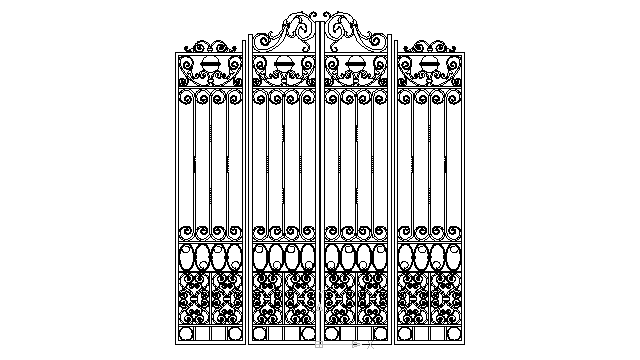
Autocad block : ironwork gate 1 in front view
Description of this template : gate, ironworks, castle, palace, luxury, entrance, wrought iron, patrimony, mansion, real estate, architecture, french,spanish, closed, stylish, prestigious, gate, iron, decoration, lock, doorway, defending, steel, iron ornamental,wrought iron door,iron fence.
front or back yard, steel fence, fence, entrance, decor, wrought iron, mansion, rod iron, protection, wall, frame, close up, strength, metal,iron fence
Tags for this template : ironwork gate 1 autocad blocks close entrance yard symbols lock prestigious steel rod decoration architecture protection castle free spanish pictures estate iron blueprints figures back wall frame templates patrimony wrought mansion front block palace zwcad fence
Categories for this AutoCAD block : Decorative elements
Tags for this category : autocad, drawing, block, dwg, dxf, templates, library, doors, windows, gates, ceiling, center, decoration, iron, works, decorative, ornaments, elements, sculptures, architecture, deco, architectural, design, architect, decor, architects, house, wall, mirrors, kitchen, outdoor, country, designer, home, arch, competition, french.
Audience :
These free CAD blocks are designed for AutoCAD users on Windows, Mac, and the AutoCAD Mobile app. They are especially useful for AutoCAD students, draftsmen, architects, engineers, builders, and designers who work with DWG and DXF files, as well as illustrators and professionals seeking reliable, ready-to-use CAD resources.
Compatibility notes :
DWG files ( Autocad drawing ) :
These drawings are saved in the AutoCAD 2000 DWG file format to ensure broad compatibility across multiple versions, from AutoCAD 2000 and 2000i up to AutoCAD 2018, 2019, 2020, 2021, 2022, 2023, 2024,2025 and the latest AutoCAD 2026. They are also supported by CAD applications such as ZWCAD, AutoCAD 360, AutoSketch, AutoCAD Mechanical, Autodesk Inventor, AutoCAD for Mac, and the AutoCAD Mobile app. In addition, DWG files are compatible with BIM software such as Revit, enhancing integration with Building Information Modeling workflows.
DXF files ( Drawing eXchange Format ) :
This CAD data exchange format is supported by a wide range of design and drafting software, including Adobe Illustrator, ZWCAD, FreeCAD, TurboCAD, ArchiCAD, MiniCAD, ArcMap, Cadwork, CorelDRAW, Google SketchUp, IntelliCAD, MicroStation, Rhinoceros 3D, Solid Edge, SolidWorks, LibreCAD for Linux systems, BricsCAD, VectorWorks, SketchUp Pro, Adobe Acrobat, Inventor, Pro/ENGINEER, CATIA, DraftSight, and more.
Block Information :

TOP Ranking : # 750

Library : no Lib

UCS View : in front view

Scale in Imperial System : DU = inches
Scale in Metric System : DU = millimetres

.dwg file size :about 843.83 KB

.dxf file size :no file

Cost : FREE